Threat model
What it is
This page lists what Sbarbase protects, who it protects it from, where the trust boundaries are, and which mitigation and which recorded check stand behind each claim. It ends with the gaps that are known and open. It describes the code at this revision, which is in development and not production ready; it is not a security certification.
How to report a problem is in the security policy.
Why
Sbarbase puts many Supabase projects on one server. Sharing a server is only worth it if one environment's visitors, keys or service logins cannot reach another environment, and if the operator knows exactly which parts are shared. A threat model written against the code, with every claim tied to a test or an evidence file, keeps the design honest: a mitigation without a check is listed as a gap, not as a feature.
Choice: trusted operators, untrusted app visitors. This is the same trust model as isolation and trust and the security and operations review. Protection against a hostile server operator is not attempted.
How we built it
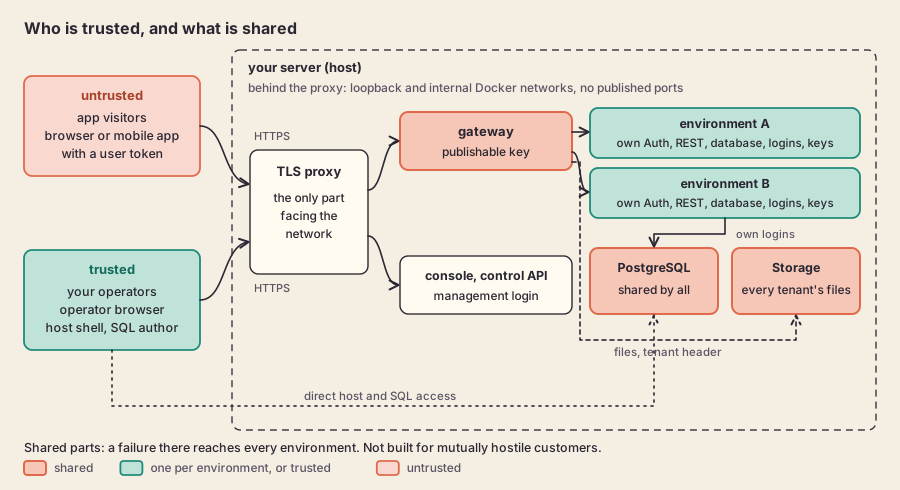
Trust boundaries: untrusted visitors enter only through the TLS proxy and the gateway.
Assets
| Asset | Where it lives |
|---|---|
| Application data per environment | One PostgreSQL database per environment on the shared engine; that environment's objects in the shared Storage process |
| Service credentials | Three service logins per environment (Auth, REST, Storage) with passwords generated per environment (secrets.token_hex(32) in Runtime.provision, lab/durable_runtime.py), kept in the private state directory |
| Signing keys | Each environment's Auth signing secret and Storage signing keys; secret API keys, stored only as SHA-256 hashes, and publishable keys, public by design and kept so the console can show them again (src/control/keys.ts) |
| Access tokens | Personal tokens (sbp_...) for agents and tools, stored only as SHA-256 digests with their scope and expiry (src/control/access-tokens.ts) |
| Vault secrets | Each environment's vault.secrets, encrypted with one root key that belongs to the server |
| Operator identity | Accounts in a dedicated management Auth realm, separate from every application Auth (src/control/auth.ts); memberships and roles in the control catalog |
| Backups | Encrypted per-environment export bundles and their keys; any copies of the database volumes the operator makes |
Actors
| Actor | Trust | What they can do |
|---|---|---|
| Host operator | Trusted | Root or Docker on the host, the PostgreSQL administrator login, the private state directory, arbitrary SQL in any environment. Not defended against. |
| Application visitor | Untrusted | Anonymous or signed-in requests to any environment through the gateway, with that environment's publishable key and their own token. |
| Compromised environment service or leaked environment key | Untrusted | Holds one environment's service login password, publishable or secret key, or Auth token and tries to reach another environment or the platform. |
| Leaked access token or misled agent | Untrusted | Holds a person's access token (sbp_...), or is an AI agent acting on untrusted content, and calls the MCP endpoint or the /v1 API. It can do what that person can do within the token's scope and read-only flag, through the console's own routes; it cannot manage tokens, members, sign-in settings or the server. Revocation, expiry and a password reset on the server end it (AI agents). |
| Compromised dependency | Untrusted | A modified upstream image, package or CI action that runs with the privileges of the component that loads it. |
| Network attacker | Untrusted | Observes or tampers with traffic between visitors or operators and the server, or sends crafted requests to whatever is exposed. |
Trust boundaries
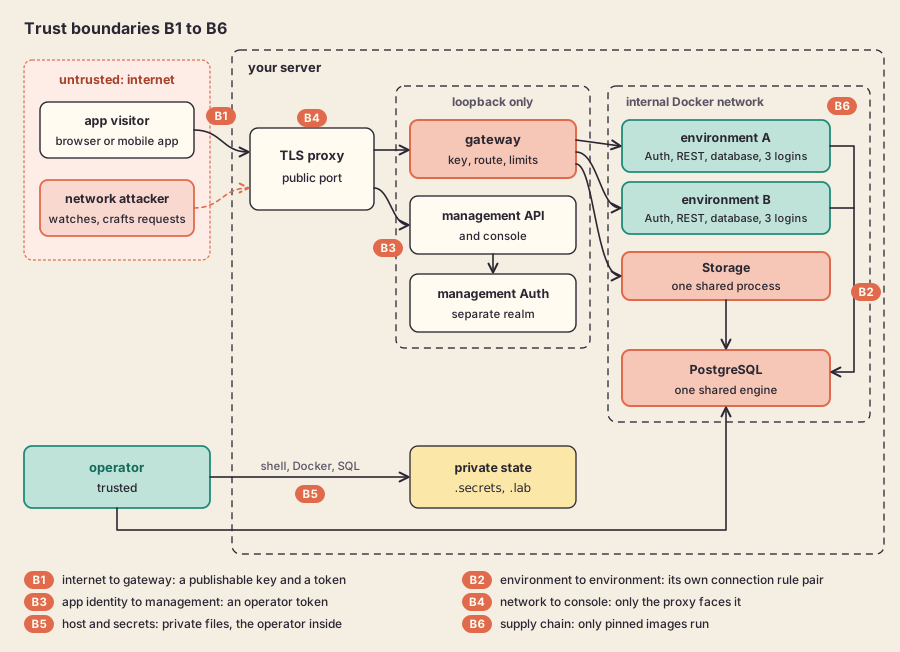
Six boundaries, each named in the list below and in the table after it.
- B1, internet to gateway. Everything a visitor sends is untrusted until the gateway has bound a key to one enabled environment.
- B2, environment to environment. Each environment's tokens and service logins must be useless in any other environment.
- B3, application identity to management. An application's users must never be treated as operators.
- B4, public network to console. Only the TLS proxy faces the network; everything behind it binds loopback.
- B5, host and secrets. Credentials stay in private files and out of logs and evidence. The operator is inside this boundary.
- B6, supply chain. Only pinned upstream images run.
Threats and mitigations
Evidence files are written by live probes and each carries its own scope; the check names below are quoted from them. Tests run in the unit suites.
| Boundary | Threat | Mitigation | Shown by |
|---|---|---|---|
| B1 | Request without a key, or with environment A's key on environment B's route | Route regex picks the environment; the key must resolve for that environment in the key store; disabled or unknown environments answer 404 (src/gateway/handler.ts) | tests/gateway.test.ts ("missing key", "cross environment", "disabled environment"); storage-gateway-checks.json ("API key cannot select neighbor Storage route") |
| B1 | Client chooses the upstream host or escapes the path | Upstream comes only from the route registry; encoded slashes, backslashes and NUL are refused; only a fixed list of headers is forwarded | tests/gateway.test.ts ("encoded slash", "forward selected route and strip client-injected internal headers") |
| B1 | Client picks another Storage tenant | Tenant header set only from trusted route configuration | storage-gateway-checks.json ("injected tenant header cannot select neighbor"); tests/gateway.test.ts |
| B1 | Revoked key keeps working, or a key store failure falls back to accepting keys | Lookup excludes revoked rows; a lookup error answers 503, never a static fallback | tests/gateway.test.ts ("removed key stops subsequent requests", "key store failure cannot fall back to static key acceptance"); connection-checks.json ("revocation immediately removes gateway access") |
| B1 | Keyless Storage read reaches private data | Only public object reads and signed URLs with one token may omit a key; Storage checks visibility and signature | tests/gateway.test.ts ("only public and signed Storage reads may omit API keys"); storage-url-checks.json ("public URL cannot disclose private bucket", "signed URL cannot select another environment") |
| B1 | One environment floods the gateway | Per-environment concurrency admission without a queue, 1 MiB body cap (Storage uploads: the upload limit, failing after a thirty second stall), body read deadline, 15 second upstream deadline | tests/concurrency.test.ts; tests/gateway.test.ts ("oversize stream rejected before upstream", "slow body deadline ..."); gateway-overload-checks.json |
| B2 | Environment A's user token used at B's Auth or REST | Separate Auth signing secret per environment | upstream-environment-checks.json ("env_alpha token denied by env_beta Auth", "... by env_beta REST") |
| B2 | Environment A's service login connects to B's database or becomes an administrator | CONNECT granted only to the environment's own logins; HBA rules name exact database and login pairs with SCRAM and end in reject for everything else (hba_content in lab/durable_runtime.py) |
upstream-environment-checks.json ("env_alpha auth denied database env_beta", "env_alpha REST role cannot assume global admin"); shared-storage-checks.json ("env_alpha storage credential denied by env_beta") |
| B2 | Connection rules lost or half written after a crash, opening or closing the wrong pairs | Journaled, fenced HBA publication with exact ownership and reload acknowledgment | lab/test_hba_authority.py, lab/test_atomic_hba.py; upstream-hba-apply-checks.json |
| B2 | Same object path in two environments returns the other's bytes | Storage tenant per environment with its own database and signing keys | shared-storage-checks.json ("env_alpha same object path returns only its own bytes", "env_alpha rejects other environment service token") |
| B3 | Application user's token accepted by the management API | Management identity comes from a fixed, dedicated Auth endpoint; anonymous users refused | management-checks.json ("application realm token rejected by live management Auth"); tests/management.test.ts |
| B3 | Actor or role spoofed in a header or body | Actor derived only from authentication; memberships read from the catalog on each request | management-checks.json ("body actor spoofing rejected", "valid nonmember denied despite injected owner header"); tests/catalog.test.ts |
| B3 | Application identity issues or lists keys | Key routes require a management actor with rights on that environment; raw keys returned once, listings carry metadata only | connection-checks.json ("application identity cannot issue management keys", "key list never discloses raw token"); tests/key-http.test.ts, tests/keys.test.ts |
| B4 | Open redirect or host header injection at the public edge | Redirect and forwarded host come from --public-host; client forwarding headers dropped; upstream must be loopback (deploy/console-tls-proxy.ts) |
tls-termination.json ("the redirect never points at a client supplied host", "a non-loopback upstream is refused"); lab/test_tls_termination.py |
| B4 | Credentials logged at the edge, or a readable certificate key | Proxy logs method, path and status only; refuses a group or world readable key | tls-termination.json ("a group or world readable key is refused"); lab/test_tls_termination.py (test_the_proxy_never_logs_bodies_or_credentials) |
| B5 | Secret files readable by other users | Operator file and key store written with mode 0600 |
Operator file tested in lab/test_operator_file.py; key store mode set in src/control/keys.ts (chmodSync(path,0o600)), source only, no test |
| B5 | Passwords in command output, notifications or recorded evidence | Redaction before output; summaries omit secret values | lab/test_mail_config.py, lab/test_notifications.py, lab/test_deployment_rehearsal.py, lab/test_runtime_reuse.py |
| B5 | Export bundle carries platform-wide credentials | Export includes only the selected environment's logins and configuration | recovery-export-checks.json ("shared platform credentials not added to configuration") |
| B6 | Tampered or silently changed upstream image | Images run by pinned digest; preflight refuses a missing or mismatched pin and never pulls; retained containers are checked for drift before reuse | lab/test_pinned_images.py, lab/test_runtime_reuse.py; pinned-images.json |
Compared with a shared service login
GustavoMartins123/supabase-multitenant is the closest existing project in topology. In its per-project templates at commit 0ec74541 (2026-08-11), every project's Auth, REST and Storage connect as the cluster-wide roles supabase_auth_admin, authenticator and supabase_storage_admin, with the one POSTGRES_PASSWORD read from the shared servidor/.env; a .project_id suffix on the user name selects the project's pooler tenant (dockercomposetemplate, .envtemplate). Sbarbase instead creates three logins per environment with their own generated passwords and one HBA rule per exact database and login pair. This is a reading of source, not a test of that project, and it says nothing about the rest of its design; the broader comparison is in alternatives.
Limits
Known gaps
These are open. They are listed so an operator can decide whether Sbarbase fits, and so a report about them is judged against what is already public.
- The shared Storage process holds every tenant's configuration. A compromise of that one process is a compromise of every environment's files. See the shared Storage review.
- The shared PostgreSQL engine is a shared failure boundary. A crash, full disk or long lock affects every environment on it, and the canonical API roles (
anon,authenticated,service_role) exist once per engine. - Signed URLs survive key revocation until they expire. Revoking a publishable key stops keyed requests at once, but a Storage signed URL issued earlier still works until its expiry (storage-url-checks.json, "env_alpha signed URL remains independent of API-key revocation until expiry").
- No tamper-evident or off-host audit log. The catalog records audit events locally (
audit_eventsin src/control/catalog.ts); anyone with host access can change them, and nothing ships them elsewhere. - Per-environment Studio holds a database login while it runs. It is served only behind a signed console session on its own address, and its login is not a superuser and closes when Studio stops (Studio guide). It works with the developer login's rights, so an owner or admin with an open session can read every row of that environment, including rows hidden by row security, and change its tables and policies.
- Vault's root key is shared by the server. Every environment's Vault secrets are encrypted with the same key, so a copy of one environment's
vault.secretscan be read in any environment of that server. They stay apart only because each environment reaches its own database (database access). - Off-host backups are opt-in. Encrypted copies to S3-compatible storage run only once the operator configures a bucket and its key (backup and restore); until then every backup lives on the server it protects.
- Operators can run arbitrary SQL by design. Isolation holds against application visitors and leaked environment credentials, not against a trusted SQL author.
- The service account is root equivalent. deploy/sbarbase.service gives it the
dockergroup so it can manage containers. This is a decision, not an oversight; the next section gives the options and why. - HBA rules restrict login and database, not source address. Rules use
0.0.0.0/0and rely on the database sitting on an internal Docker network with no published port; the PostgreSQL administrator connects over the local socket withtrust, which fits the trusted operator model. - Reloading connection rules alone does not end sessions already open. The fence paths terminate them explicitly (lab/source_fence.py); any other change that relies only on an HBA reload leaves existing connections in place until they close.
- Resource tiers are configured, not calibrated under sustained load.
The docker group: a decision
The supervisor manages its own containers through the Docker API. It pulls the pinned images, creates networks and volumes, creates and starts containers, runs psql and pg_isready inside the database container with docker exec, and reads inspect, stats and logs; the console process reads container use and logs through the same socket (src/control/observe.ts). The unit grants that access with SupplementaryGroups=docker. Whoever can write to the Docker socket can start a container with --privileged or with the host's / mounted, so the service account, and any code that runs as it, is root on the host in practice. A code execution flaw in the supervisor, the worker or the console is therefore a host compromise, not an installation compromise.
Three options were considered.
- Rootless Docker. The daemon runs as the service account, so a privileged container or an escape lands in that account instead of root. It is not a switch: the memory, pids and CPU limits the resource policy sets and the admission counts are only enforced when systemd delegates the cgroup v2 controllers to that user; retained volumes are owned through a subordinate UID range, so an existing installation needs a data migration; and the supervisor reaches Auth, REST and Storage at their addresses on the Docker network, which under rootless Docker live in the user's own network namespace and are not reachable from the host, so the way the console and gateway reach the services would have to be redesigned. None of this has been run with Sbarbase.
- A socket proxy that filters API calls. A proxy in front of the socket can allow some endpoints and methods and refuse the rest. It does not make the account safe here. The runtime needs container create, start and exec, and a filter by path and method that allows
POST /containers/createalso allows a request body withPrivileged, a bind mount of/, added capabilities, the host PID or network namespace, or a host device. Allowing exec lets the caller run any command in any container it can name, the database included. Narrowing that needs a filter that parses and checks every request body (a Docker authorization plugin, or a proxy that understands the create request), which is a new component on the path of every privileged call; a mistake in it is again root on the host. - Keep the
dockergroup. This is the current stance.
The service account stays in the docker group, and this threat model counts it as root. What follows for an operator: run Sbarbase on a server that holds nothing that must be protected from the installation itself, treat access to the service account as root access, and keep the console behind the TLS proxy on loopback as the server deployment guide describes. Rootless Docker is the option to try first, because it moves the boundary instead of adding a filter in front of it; it needs its own rehearsal on a server before anything is claimed for it.
Go deeper
- Security policy: supported versions, private reporting and the operator hardening checklist.
- Isolation and trust and the security and operations review.
- Source HBA integration, atomic HBA replacement and SQL operation fence.
- Gateway overload, gateway drain and the server deployment guide section on HTTPS and network exposure.